
Struggling to get your website noticed online? It’s time to discover why you should opt for the SEO Checklist. This indispensable tool is designed to significantly improve your website’s search rankings.
Our essential SEO checklist guides you through crucial steps to enhance your online visibility. You’ll learn how to optimize content for target keywords, improve site speed for a better user experience, and implement best practices that Google loves. Don’t let your valuable content get lost in the digital noise. Grab our SEO Checklist today and start climbing those search results pages!
Why follow our SEO basics checklist? Simply buying a domain and setting up a website doesn’t make it SEO-ready. Your site needs more! Here’s a basic SEO checklist to get you started. Ensure your website is optimized from day one for better search visibility. Start your SEO journey effectively today!
Wondering how to truly boost your Shopify store’s visibility and search rankings? This is why you should use Google Search Console. I will add Google Search Console on your store – it’s a completely free tool that empowers website owners to monitor their site’s organic Google traffic, track search performance, and quickly discover issues that could prevent their site from ranking higher.
Why follow our SEO basics checklist? Simply buying a domain and setting up a website doesn’t make it SEO-ready. Your site needs more! Here’s a basic SEO checklist to get you started. Ensure your website is optimized from day one for better search visibility. Start your SEO journey effectively today!
Bing Webmaster Tools is a free Microsoft service that lets you add your store to the Bing crawler. Open a free Bing Webmaster account by going to the signup page, then add and verify your website to appear in Bing search results.
A sitemap helps Google and other search engines understand how your website is structured. It acts like a roadmap, guiding search engine bots through the pages of your site to ensure they’re properly indexed.
If you’re using Shopify, the good news is that a sitemap is automatically generated for your store. This file includes all your product pages, collections, blog posts, and more. You can easily access it by visiting:
www.yourstore.com/sitemap.xml
For WordPress users, creating a sitemap is just as simple—just install the Yoast SEO plugin, which will automatically generate one for you.
Once your sitemap is ready, submit it to major search engines. Use Google Search Console for Google and Bing Webmaster Tools for Bing. Submitting your sitemap helps search engines crawl your site more efficiently, improving your visibility and SEO performance.
Google Analytics is a powerful tool that provides detailed insights into how users interact with your website. Once it’s set up, you can track and segment visitors to understand their behavior—especially those arriving from search engines.
To get started, create a Google Analytics account and add your website as a property. Next, set up a data stream by inserting your unique Google tag ID into your website’s code. This process is simple if you’re using a CMS like Shopify or WordPress, as both platforms support easy integration with Google Analytics.
With proper setup, you’ll gain valuable data to improve traffic, engagement, and conversions.
To appear in Google or other search engine results, your website must first be indexed. An easy way to check if your site is indexed is by performing a site search on Google. Simply type site:yourdomain.com into the search bar.
If no results appear, it means your site hasn’t been indexed yet. Keep in mind that indexing can take several days to a week after submitting your sitemap. Also, note that Google cannot index password-protected pages or content blocked by your site’s robots.txt file.
Ensuring proper indexing is a crucial step in improving your SEO visibility.
Keeping up with algorithm changes, rankings, and competitor keywords is challenging but necessary for online businesses. There are good paid and free SEO tools I can use to meet search goals. You’re already one step ahead by setting up Google Search Console and Analytics.
Shopify online stores have built-in SEO features that automatically add canonical tags to pages (to prevent duplicate content from showing in SERPs), generate your XML site map, and generate title tags including your store name on Shopify-owned themes.
Keyword research uncovers the words and phrases your target audience is searching for. Here’s how to find them, so you can target relevant keywords on your website.
Use keyword research tools from Moz, Ahrefs, or Semrush to identify which words your target customers use when searching for products or services like yours. They’ll present you with a list of keywords based on your seed keyword. If you’re selling gifts, for example, your seed keyword might be “best gifts for moms.
We can learn a lot about SEO from competitors who’ve already done the background research to identify keywords.
Will enter your competitor’s URL into an SEO tool, such as Semrush or Moz. The software will pull a list of keywords that your competitors are ranking for and tell you which position each URL sits at for the corresponding keyword.
Now that you’ve compiled a solid list of keywords, the next step is to narrow down the phrases your target audience is most likely to search for. Focus on understanding the search intent behind each keyword—whether users are looking for information, comparing products, or ready to buy.
Once that’s clear, map each keyword to the most relevant content type on your Shopify store. For example, product pages, category pages, blog posts, and even the homepage can each be optimized for different long-tail keywords based on intent.
You might decide to make a collection page for citrus essential oils (lemon, lime, grapefruit) and another for essential oil bottles (glass, roller, spray). You could also write articles that target long-tail keywords related to questions regarding essential oils, for instance, a story on uses for lavender essential oil.
As an experienced SEO expert, I specialize in on-page SEO, which involves optimizing each individual page of a website to improve its visibility in search engine results. This process is essential for driving organic traffic and ensuring that your content reaches the right audience.
Optimizing a page for search engines requires more than just inserting keywords. It’s about creating high-quality, structured content that meets user intent while also aligning with technical SEO best practices. Since you’re often competing with well-established websites, every element—from titles and meta descriptions to internal links and content formatting—must be finely tuned.
Over the years, I’ve developed a proven on-page SEO checklist that I use to ensure every page I work on is fully optimized for both users and search engines. From keyword placement and header structure to image optimization and schema markup, I apply strategies that increase rankings and drive long-term growth.
If you want your website to stand out in the search results, proper on-page SEO isn’t optional—it’s essential. Let me help you turn each of your pages into a high-performing asset that brings consistent traffic and measurable results.
As an SEO expert, I always emphasize the importance of proper heading structure—especially the use of H1 tags. The H1 tag serves as the primary headline of a web page and typically contains that page’s main keyword or phrase. It’s one of the first elements search engines analyze to determine the context and relevance of the content.
For optimal SEO performance, it’s best practice to use only one H1 tag per page. This keeps your content focused and makes it easier for both users and search engines to understand what the page is about. For instance, if you’re selling a product named “Lemon Drop Bliss”, and it’s targeted toward users looking for lemon essential oils, your H1 could be something simple yet keyword-rich like “Lemon Essential Oil.”
In the case of Shopify, it’s important to note that the page title automatically becomes the H1 tag when creating product or content pages. That’s why it’s critical to write clear, keyword-optimized page titles—they serve both your SEO goals and the structure of your Shopify store.
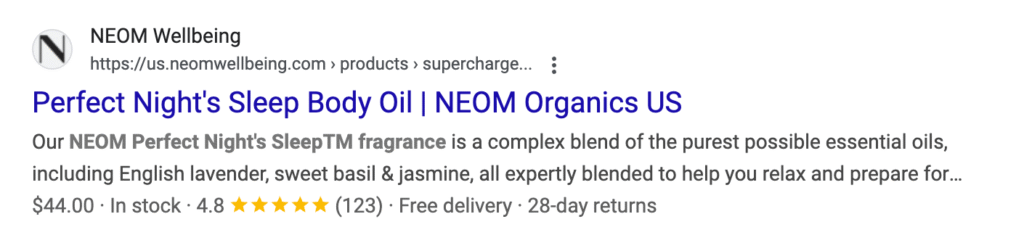
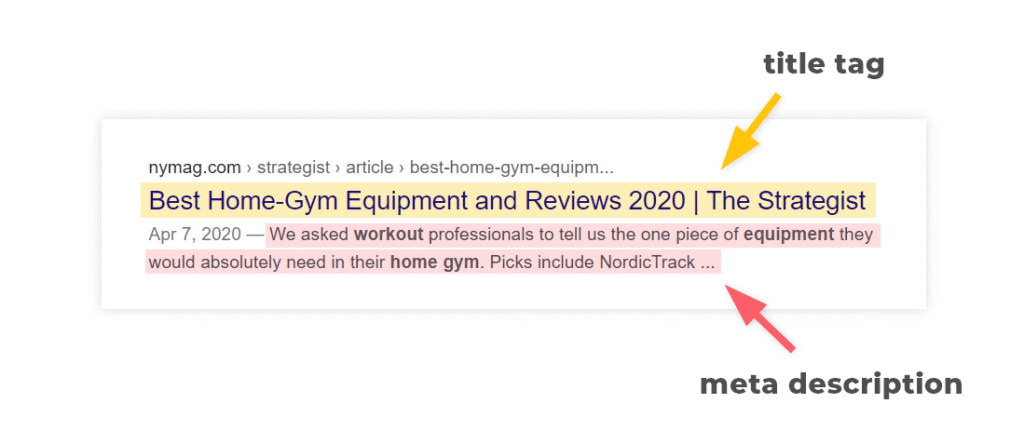
Appearing in search results is only part of the job. You also need to convince users to visit your page over the other options. Title tags—the blue clickable links that appear in the SERP—help you do this.
A meta description is the small snippet of text that appears below your title tag in the SERP. The copy you write here should clearly describe the content on the page and also be compelling enough to click.
There’s no exact character count for showing or truncating meta descriptions. However, research from Moz indicates many meta descriptions are cut off around the 155 to 160 character mark.
Include your target keywords and strongest copy at the very beginning of your meta description, and avoid going over 160 characters.
A universal resource locator, or URL, tells search engines about the content on your page. Include your target keyword but otherwise keep URLs short and sweet by avoiding filler words.
Since both search engines and visitors read your URL, you’ll want to follow a few best practices:
Keep your URL structures simple and easy to understand.
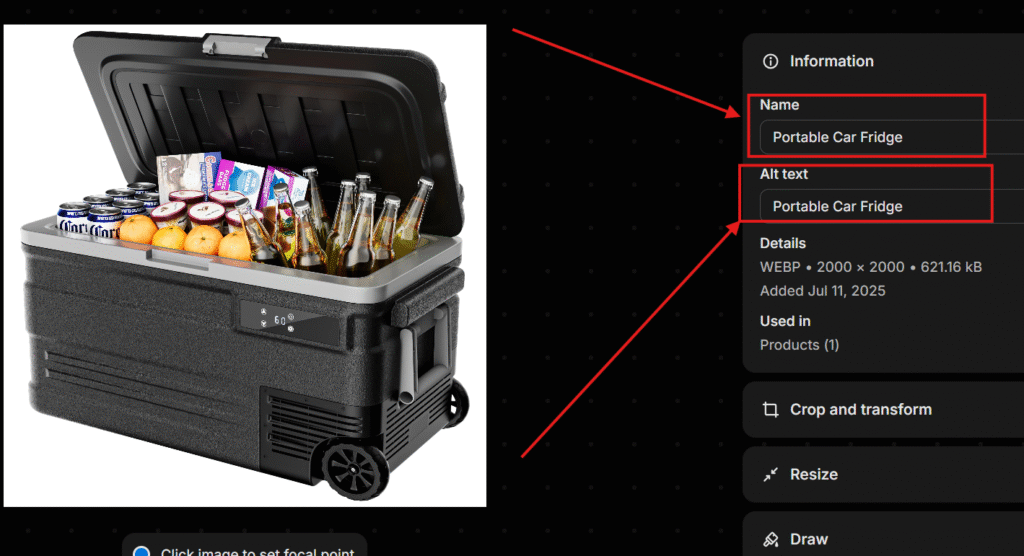
To ensure your photos appear in image results, name each image file something descriptive (i.e., don’t name an image “83798.jpg”).
Write descriptive alt text explaining the picture, too—a best practice that helps search engines understand image content and makes it accessible to people who are blind or visually impaired.
Schema markup helps Google understand your website content. It structures data so page information can appear directly in SERPs, which can increase click-through rates and website traffic.
In the example below, Couplet Coffee uses schema to display its five-star rating and customer reviews.
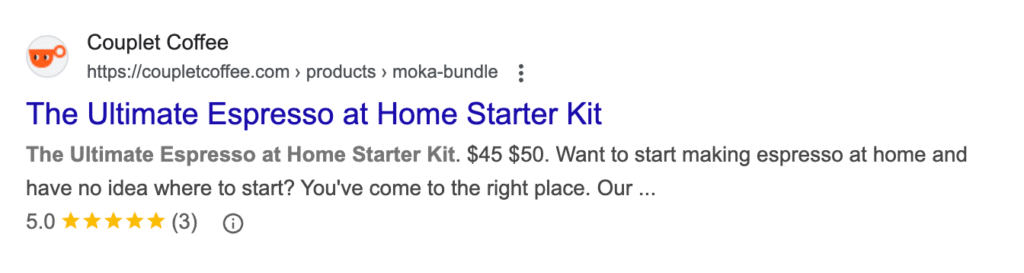
Shopify assists by automatically generating product schema for merchants. To go the extra mile, apps like Judge.me collect customer reviews and display an aggregate rating, as in the Couplet Coffee example above.
As Jake Munday, co-founder of Custom Neon, says, “Relevant, interesting, useful, or even fun content on your site actively encourages visitors to hang around longer, ultimately helping to improve search engine rankings.”
Let’s walk through an SEO content checklist to help optimize your website content.
Developing and executing a full-fledged content marketing strategy can take months, so it’s important to prioritize. Starting with your product and collection pages is a best practice. If you’re whizzing through this SEO checklist fast, use these exercises to get started:
Although higher word counts correlate with higher rankings, quality is far more important than quantity. Don’t add hundreds of words of fluff if customers don’t need it.
Duplicate content is when similar content exists on two different URLs, making it difficult for search engines to determine which of the two pages to rank.
If you own an ecommerce business, for example, don’t use manufacturers’ descriptions verbatim. Instead, writing your own product descriptions reduces duplicate content and provides an opportunity to apply your brand voice and sales strategies. All content on your website should be original and unique.
If you can’t avoid duplicate content on dynamic pages, use canonical URLs to tell Google which page to prioritize, and noindex and nofollow tags to tell Google not to index specific pages.
When it comes to eCommerce, Shopify collection pages are essential for unlocking your store’s full SEO potential. These pages organize related products into relevant categories, making it easier for users to navigate your site while enhancing the overall shopping experience. More importantly, collection pages are highly crawlable by search engines, helping you rank for valuable category-level keywords.
For many successful brands, collection pages drive more organic traffic and conversions than any other page type. By presenting multiple related products on one page, you increase visibility and create more opportunities for internal linking and keyword optimization.
These pages act as landing pages that attract and retain customers, ultimately boosting revenue. With well-optimized Shopify collections, you not only improve site structure but also tap into high-converting traffic sources.
In short, collection pages are the SEO backbone of any Shopify store—don’t overlook their importance.
“Create backlinks for these collections, create blog posts that internally link to them to establish topical authority—and you have a money machine.”
As a Technical SEO expert, I understand that while technical SEO can be complex, it’s absolutely vital for improving website rankings and performance. I specialize in optimizing site architecture, crawlability, indexing, and page speed to ensure both users and search engines can access your content efficiently. By following a proven technical SEO checklist, I help businesses create fast, secure, and mobile-friendly websites that deliver a seamless user experience. From fixing broken links to enhancing Core Web Vitals, my goal is to ensure your site meets the latest SEO standards and performs at its best in search results.
Internal linking is one of the most important tactics in SEO marketing. It involves linking from one page to another within your own website. Linking pages of specific topics to other pages with relevant content helps search engines recognize your topical authority, categorize your content, and rank your pages. Ultimately, internal linking can improve your search engine rankings.
If you’re using My SEO checklist for your ecommerce store, show related products when a visitor is on your product pages. I will optimize a blog, internally link to other pieces that dive deeper on a specific topic, as this link does by pointing to another Shopify SEO guide.
I will also ensure that every page on your site is accessible from your homepage or within a few clicks of it. If not, it’s orphaned—which means it isn’t accessible to users or search crawlers.
Anchor text is the clickable text over a link. Search engines use this microcopy to understand the context of the page link, and which search terms it should appear in the SERP for.
Diversify your strategy with a balance of anchor text types. If you’re optimizing a blog post about blogging tools, for example, use the following anchor text on links pointing to it:
A website’s navigation holds the most important links in your online store. These links tell visitors which pages are important, giving them an easy way to get to specific sections such as the blog, product pages, or landing pages.
For SEO, your global navigation links tell crawlers the important pages on your site.
Common types of navigation links include:
A good practice is to link to your most important collection pages (and maybe product pages too, if one or two products are particularly popular).
If your pages load slowly or your site isn’t mobile responsive, Google is less likely to recommend your website in its search engine rankings. All pages need to be readable on mobile and desktop.
Every theme on the Shopify Theme Store is mobile friendly, but do a sense-check and load your website on multiple devices and browsers. Ask friends and family to do the same, and to screenshot or summarize their experiences navigating the site on their smartphones.
A search engine’s ultimate goal is to provide searchers with the best results for their queries, so site speed is a ranking factor for both desktop and mobile searches.
Sending users to frustrating, slow-loading websites would undermine a search engine’s recommendations—which is why they don’t send users to them. Run your site through PageSpeed Insights to get Google’s recommended performance-enhancing tweaks.
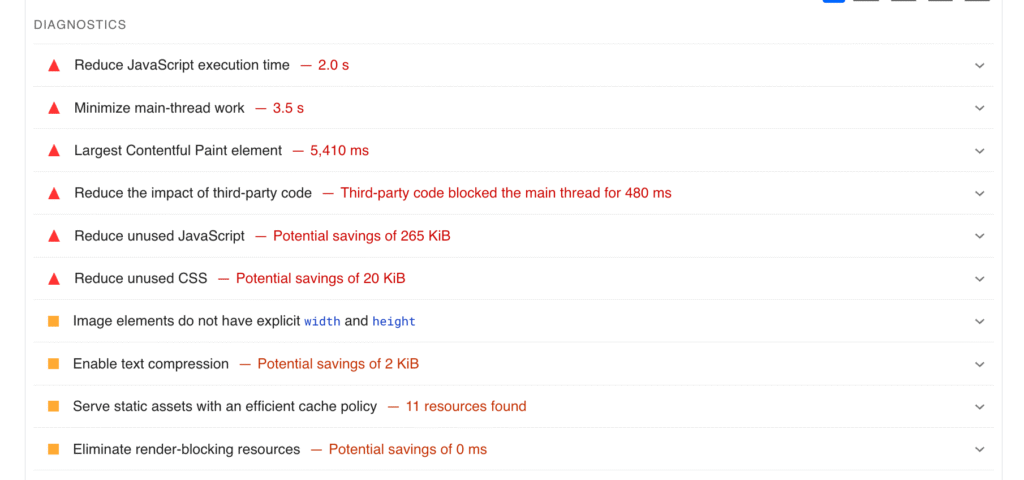
Google PageSpeed Insights offers tips for improving website loading speed.
Search engines index websites through bots that “crawl” a website and its pages. A crawling error happens when a bot tries to reach a specific page or site but fails. If you receive any error alerts, I will address them immediately.
I will use Google Search Console to check for crawling errors or broken links. When a page on your site becomes inactive—which can happen when you remove a product or when a blog post becomes outdated—you can redirect that page to another page on your site. This will prevent visitors from ending up on dead links.
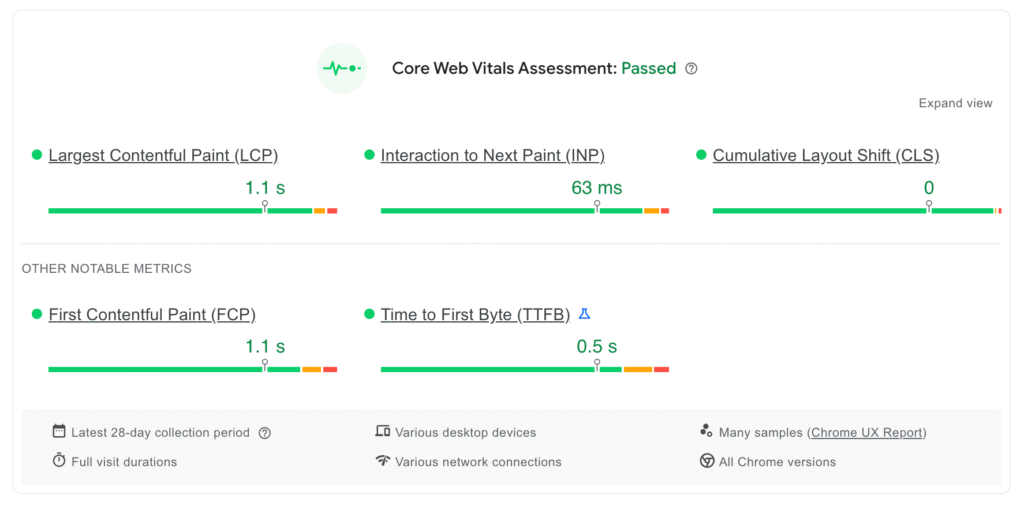
Google Core Web Vitals (CWV) measure the user experience (U/X) of your website. They are a good indicator of your website’s SEO performance and include three main components:
The easiest way to improve Core Web Vitals for your online store is by getting a good ecommerce platform to manage content delivery. Shopify stores are the fastest in the world, loading 1.8 times faster than stores on other platforms.
As a Local SEO expert, I help businesses—especially Shopify store owners—boost their visibility in local search results to attract more nearby customers. My proven Local SEO checklist ensures your store is optimized with accurate business listings, location-based keywords, Google Business Profile setup, and local citations. The benefits of Local SEO include increased foot traffic, higher online visibility, and stronger local brand authority. For a Shopify store, Local SEO is essential to reach customers searching for products near them, especially with “near me” queries on the rise. It’s a cost-effective strategy that drives targeted, high-converting traffic.
Google Business is an excellent free SEO tool for local businesses. It helps customers find you across Google Search and Maps.
Start by heading to the signup page, where you’ll enter basic information such as your business name, category, location, and contact details. Once finished, optimize your Google Business page so customers can easily search for and connect with you.
If you’re aiming to boost your online visibility, it’s essential to list your store on major directories and platforms. Web directories play a key role in improving your store’s searchability by increasing backlinks, enhancing local SEO, and driving targeted traffic. However, it’s important to choose directories wisely—focus on high-authority platforms like Google Business Profile, Yelp, Bing Places, and industry-specific sites. Accurate listings with consistent NAP (Name, Address, Phone) details not only build trust but also help search engines rank your store higher. Don’t miss out—start listing today for better online exposure.
The top 10 directories most likely to impact your rankings are:
For any businesses, your Contact Us page is important for building trust and attracting local customers.
A contact us page provides shoppers with your name, address, and phone number. This is crucial for local SEO because Google values consistent, accurate information for searchers. Be sure to update the page with any changes. The last thing you want to do is send someone to a closed store because your opening hours haven’t been updated.
If you have physical locations in multiple cities, consider creating a unique landing page for each region. This makes it easier to rank for individual market areas without having to build a separate website for each place.
As part of your local SEO checklist, create location-specific copy for each landing page. Granted, this tactic will take time and resources, especially if you have several locations. But you want to avoid creating barebones, unhelpful pages that may lead to Google penalizing your website.
If you’re planning to start an online store, implementing SEO for ecommerce is one of the most effective and sustainable ways to attract potential customers. Unlike paid ads, SEO drives long-term organic traffic by optimizing your site for search engines. From keyword research to mobile-friendly design, product page optimization, and technical SEO, every detail matters. Here’s the ultimate SEO checklist for ecommerce stores to boost your visibility, improve rankings, and increase conversions. Follow this guide to ensure your online store is search-ready from day one and set up for long-term growth.
A search engine’s goal is to direct users to the most relevant, helpful, and reliable information. Product descriptions are the ideal place to communicate your products’ value
Write unique SEO copy for each product page on your website, including variants. Use bullet points, highlighted text, and heading tags to make product content easier to digest. This improves the user experience—a known ranking factor in many search engine algorithms.
Product descriptions also provide the opportunity to include long-tail keyword variations and help Google better contextualize your product pages. For example, if you’re selling women’s leopard print jeans, use long-tail variations such as:
It’s unlikely search engines will recommend your site in SERPs if they doubt your expertise, credibility, or trustworthiness.
Make a conscious effort to collect customer reviews and display them on relevant product pages to show Google—and potential buyers—that your products are genuine and enjoyed by others. Plus, if you’ve added schema markup, the review ratings can appear in the SERP, giving searchers another reason to click your listings over a competitors’.
Shopify apps like Yotpo and Judge.me can automate this process. They can also trigger automated emails that ask customers to review products after their orders arrive.
Take advantage of Google Images results by uploading high-quality product visuals—including videos, pictures, and GIFs—to your product pages.
An important factor on your ecommerce SEO checklist, product images can also influence organic visitors to buy when they visit your website.
Remember to follow image optimization best practices for any media: compress image file sizes, name files appropriately, and consider using a content delivery network (CDN) to ensure fast load speeds.
Google is no longer a directory that connects users with websites addressing their queries. Studies show that more than half of Google queries are “zero-click” searches—meaning the user types in their query and gets their answer directly from SERP features such as:
At first glance, this sounds like bad news for website owners. In reality, Google needs to pull content from somewhere, and it credits publishers when it does—as demonstrated in this AI Overview for the phrase “what is dropshipping”:
Best practices for appearing in these zero-click placements are the same as general SEO best practices. Share helpful content, work on your formatting, and use schema markup to help Google uncover answers to direct questions that lend themselves to zero-click queries.
The only way to check whether your SEO strategy is working is to monitor key performance indicators (KPIs) such as:
Present these on an SEO reporting dashboard to make sense of your numbers and identify opportunities.
The only timeless SEO strategy is to provide searchers with what they’re looking for. Search engines, particularly Google, reward websites that achieve this. The vast majority of what we’ve included in the SEO checklists above—fast-loading websites, interesting content and copy, clear page and image descriptions—are things that make searchers’ lives easier.
Need extra help? Hire a Shopify expert to assist with your Shopify Store Re-design, Customization, strategy.